
An Extra Layer of Protection for Your Digital Banking Account
If you suspect your digital banking account has been compromised, use this feature immediately to restrict access and help protect your information. Then, contact Navigator as soon as possible for further assistance. For your security, once your account is locked, only Navigator can restore access. Members cannot unlock their accounts themselves.
Protecting your account and personal information is a top priority. That’s why Navigator offers the Lock My Account feature, giving you a quick way to take action if you believe your digital banking credentials may have been compromised.
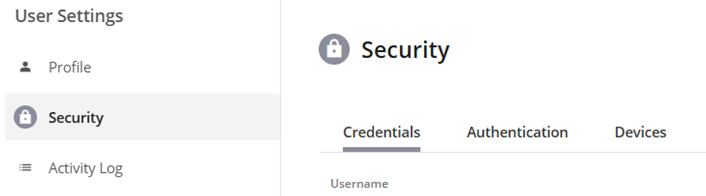
How to Access the Lock My Account Feature
Follow these simple steps:
- Open the Account Menu
- Select User Settings
- Navigate to the Security tab
- Under Credentials, select Lock My Account
When Should You Use This Feature
Consider using Lock My Account if:
- You suspect someone knows your password
- You receive unexpected login alerts or notifications
- You notice suspicious activity on your account
- You believe your device or credentials may have been compromised
Acting quickly can help prevent unauthorized access and give you peace of mind while Navigator works with you to secure your account.
If you have questions or need assistance, please contact Navigator for support. Our team is here to help keep your accounts secure.